

When we released Nexus(Opens in a new tab/window) in October, it read a Drupal site's exported configuration and drew the content model as a diagram you could explore and edit, all in your browser.
Since then we've had a round of feedback from the Drupal community, and Nexus 1.0 is the release it fed into. It checks a content model for problems, compares 2 versions of it, documents it in the formats teams already use, and reads the help text and field settings your editors see.
Nexus is still free and open source, and it still runs entirely in your browser.
What's new in Nexus 1.0
Here is what Nexus has gained since the October launch:
- 3 more templates, Umami, Thunder and Open Social, beside Drupal CMS and CivicTheme
- 4 detail levels, from entities only to every field
- Explore from here, which keeps only the entities within a few references of the one you pick
- Checks, which flag what Drupal would reject and what breaks common practice, in the app and from the command line
- Compare with, which marks every bundle, field and reference that changed between 2 versions of a model
- bundle descriptions, help text, default values and allowed values read from the configuration
- editing in the Fields table, with a count of the bundles that share each field
- Markdown notes on the canvas, and a Delete key in Edit mode
- CSV import, with a template to start from
- documentation exports in Markdown, an HTML report, Mermaid and Graphviz DOT, plus CSV files of bundles and references
- Copy link, which carries the whole diagram in the link
- Create with AI, for turning a screenshot of a whiteboard, a spreadsheet or a Word spec into a diagram
- a 26-page user manual in a Help panel, with a
?button on every panel and dialog - security measures you can verify for yourself, from a Content Security Policy to signed releases
The rest of this post walks through each of them.
Start from 5 real content models
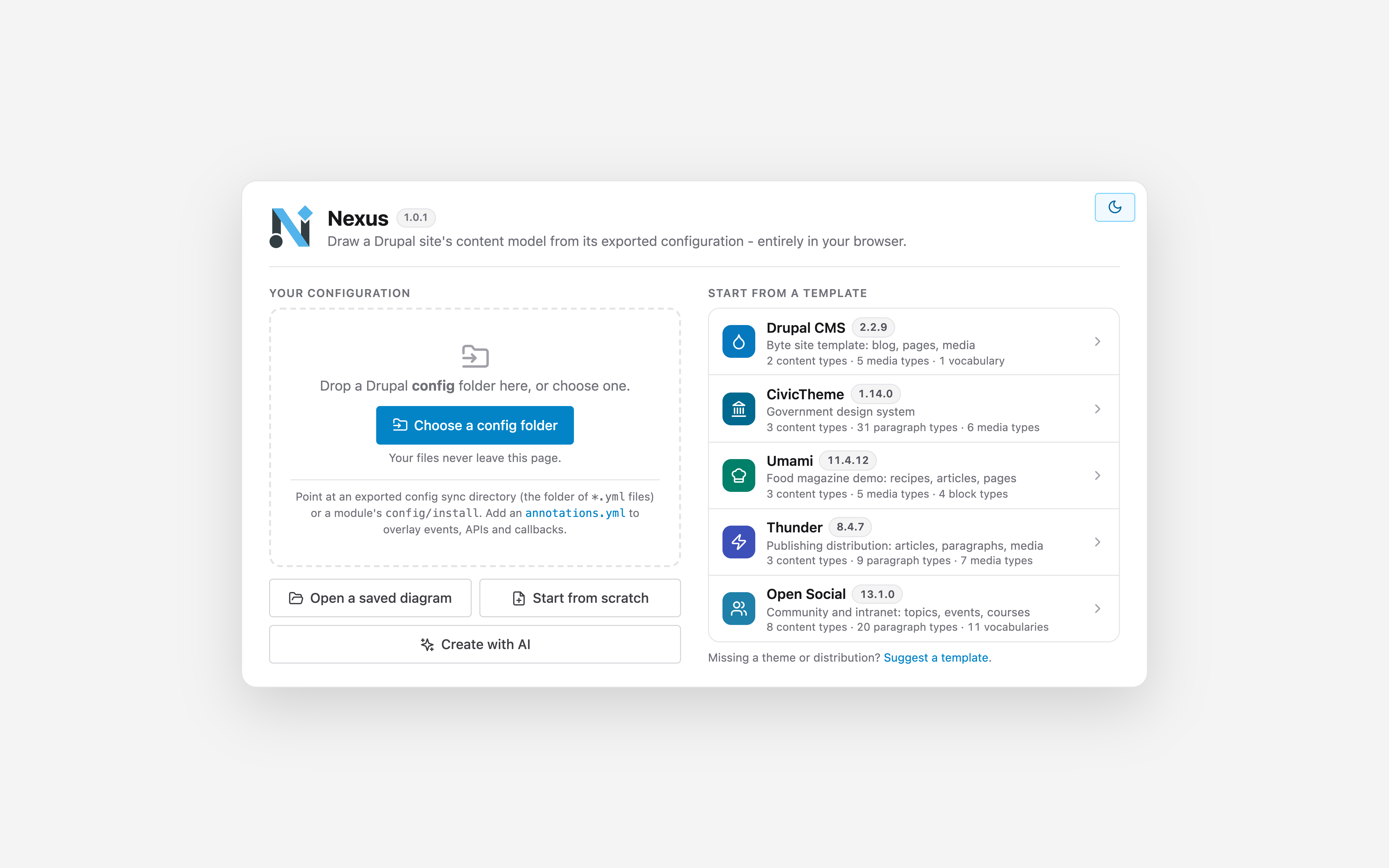
You can still drop a site's configuration folder onto the page. If you'd like to look around first, the landing screen now offers 5 templates, each drawn from the configuration of an exact public release:
| Template | Version | What it shows |
|---|---|---|
| Drupal CMS(Opens in a new tab/window) | 2.2.9 | The Byte site template: a blog, pages and 5 media types |
| CivicTheme(Opens in a new tab/window) | 1.14.0 | A government design system: 3 content types built from 31 paragraph types |
| Umami(Opens in a new tab/window) | 11.4.12 | Drupal core's food magazine demo: recipes, articles and pages |
| Thunder(Opens in a new tab/window) | 8.4.7 | A publishing distribution built from paragraphs and 7 media types |
| Open Social(Opens in a new tab/window) | 13.1.0 | A community and intranet distribution with 8 content types and 20 paragraph types |
A daily workflow watches all 5 projects and proposes a template update as soon as one of them ships a new release.
See the model at the level you need
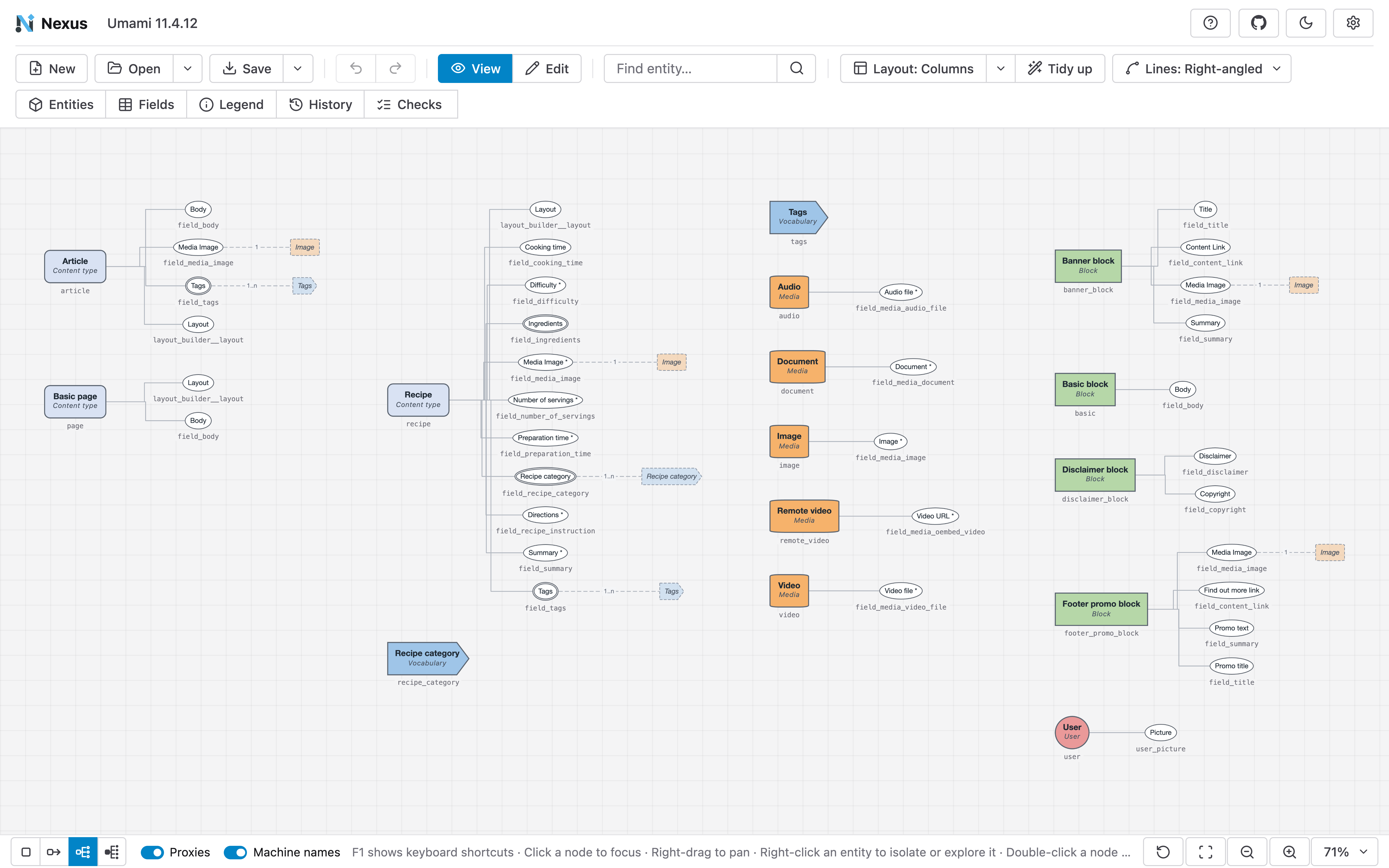
A full content model can be a lot to read at once, so the status bar now has 4 detail levels:
- Entities shows only the content types, vocabularies, media and blocks, with 1 line between each pair that reference each other.
- References adds only the fields that point at another entity.
- Configurable shows every field your team created, without the base fields Drupal adds itself.
- All shows everything.
Rest the pointer on an entity and Nexus lights up its fields, its references and the entities at each end, and fades the rest. A Lines setting draws connections right-angled, merged into 1 trunk per entity, or straight.
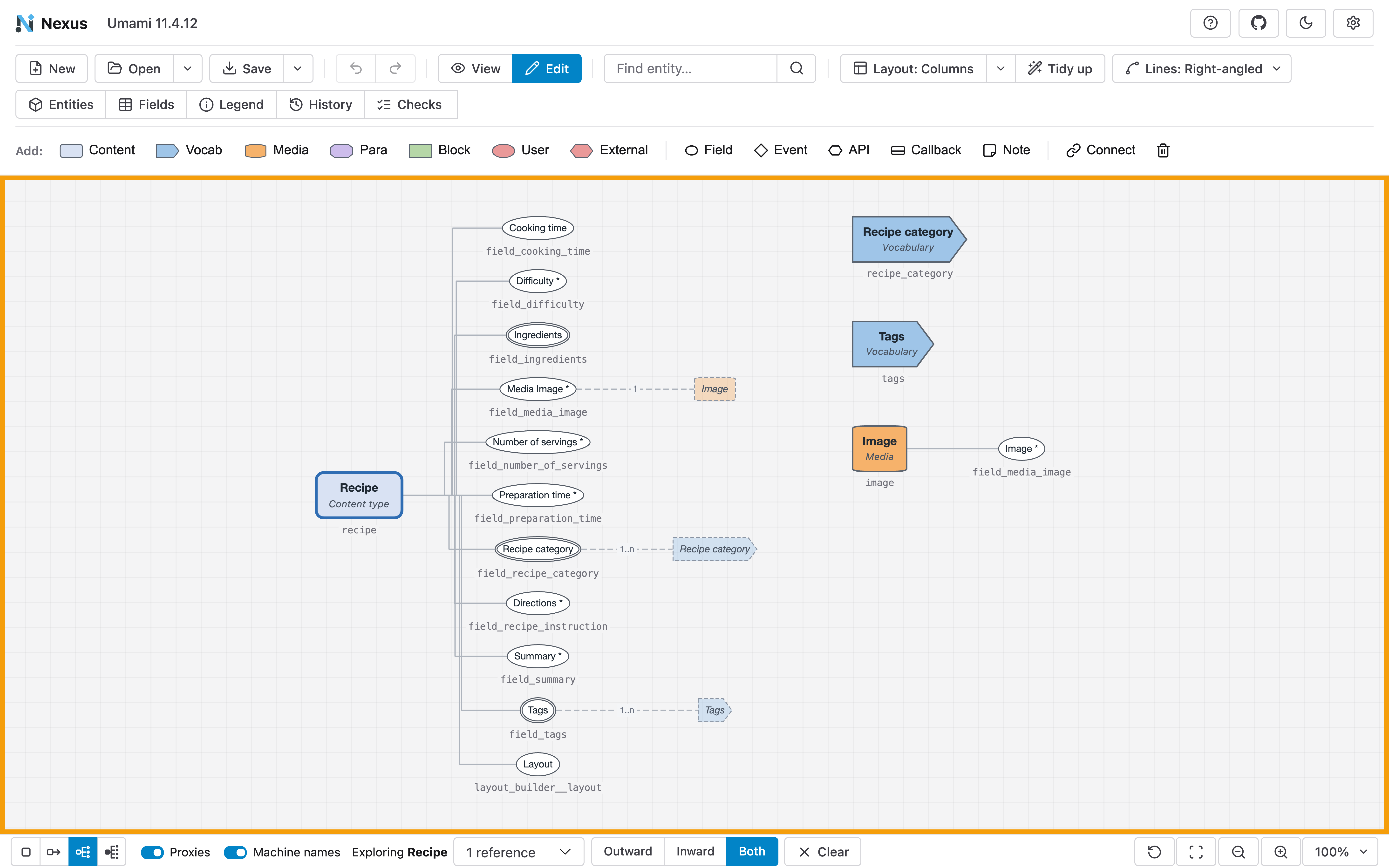
To answer a narrower question, such as "what points at this media type?", right-click an entity and pick Explore from here. Nexus keeps only the entities within 1 to 5 references of it, outward, inward or both, and lays them out again. Clear puts the whole diagram back where it was.
Find problems before Drupal does
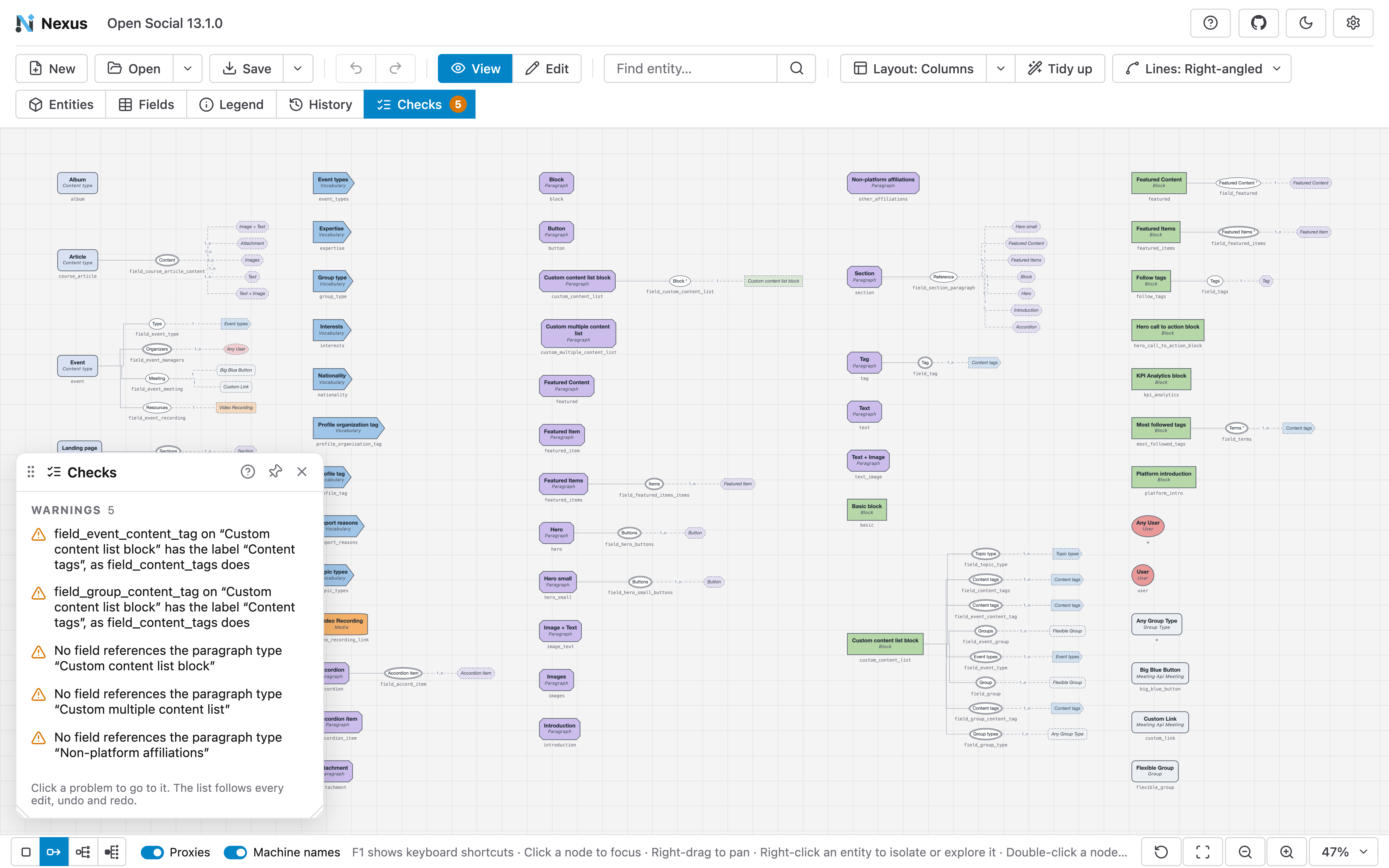
The new Checks panel lists what Drupal would reject and what breaks common practice. It re-checks after every edit, undo and redo, so it works as a running review while you sketch a model.
There are 3 rules that Nexus reports as errors:
- a reference to an entity the model doesn't have
- 1 field name used with 2 different types or cardinalities on the same entity type, which Drupal's shared field storage can't hold
- a machine name outside Drupal's pattern or length limit
5 more rules raise warnings:
- 2 fields on 1 bundle with the same label
- a paragraph type no field references
- a content, paragraph, media or block type with no fields of its own
- a list field with no allowed values
- a bundle with more fields than a limit you set in Settings
The warnings follow how Drupal actually works. Blocks sit in the block layout and media is embedded in text, so neither needs a field that references it. A vocabulary keeps its terms in its base fields, and a list field can take its values from a PHP function. Version 1.0 accounts for all of these, so the Drupal CMS, CivicTheme, Umami and Thunder templates open with no problems, and Open Social shows the 5 warnings above.
A badge on the toolbar shows the count and turns red when there is an error, and clicking a problem takes you to it on the canvas.
For teams that keep diagrams in a repository, the same rules run from the command line, so a CI job can fail when a content model breaks one of them.
Compare 2 versions of a content model
Open > Compare with sets the diagram you have open against a saved diagram or a config folder. Every bundle, field and reference that the other version adds, removes or changes is marked on the canvas: green for added, amber for changed, and faded with a dashed red border for removed. A Changes panel lists each difference by bundle, with the old and new values.
It answers "what does this release change in the content model?" and "does the site still match the spec?". Compare the config export on main with the one on a feature branch, or a planning diagram with the site that was built from it. Stopping the comparison puts the diagram back exactly as it was.
The details your editors see
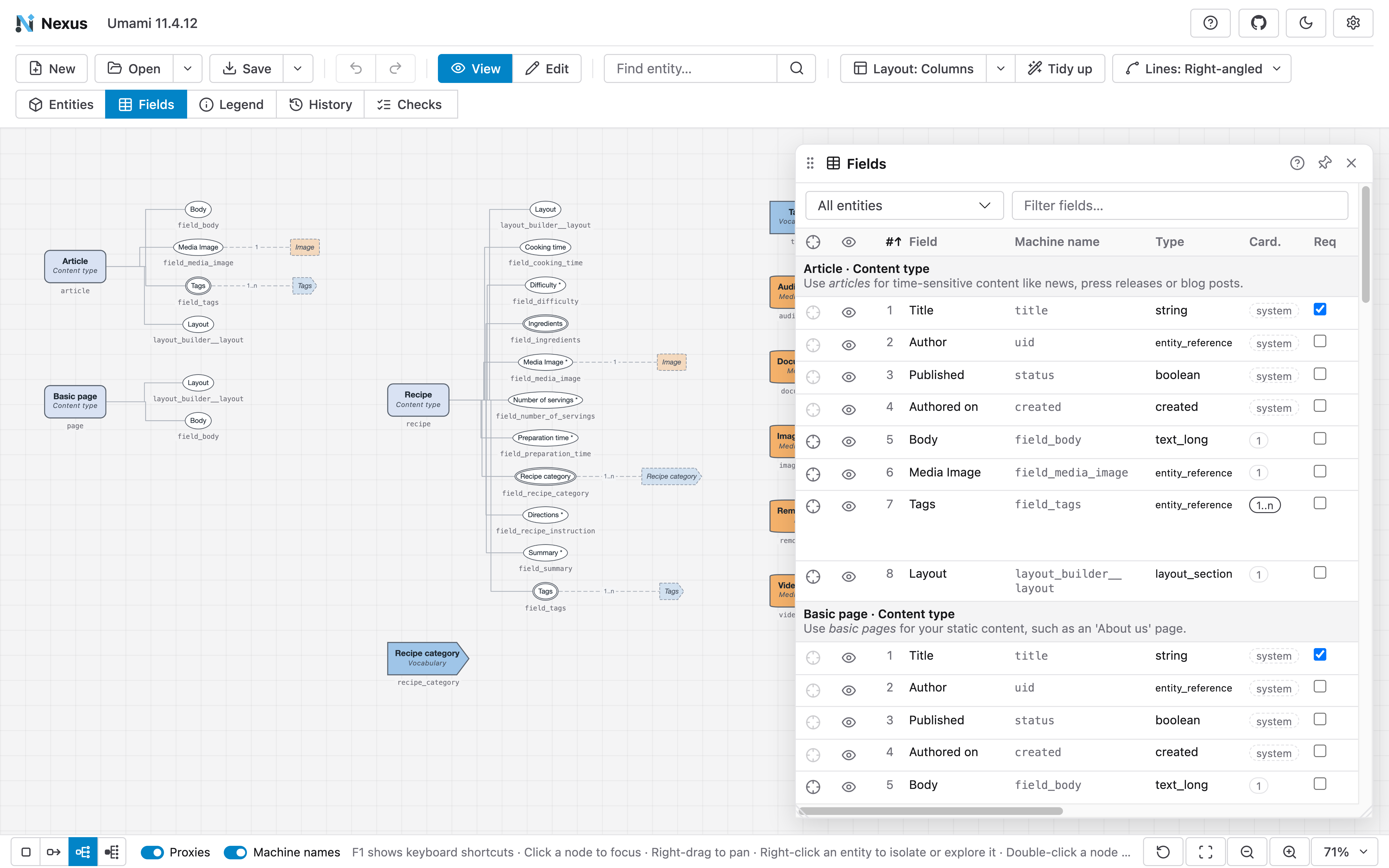
Nexus now reads each bundle's description and each field's help text, default value, allowed values and translatability from the configuration. They show in tooltips, in the Inspector and in the Fields table, so a diagram review covers what editors will read on the form as well as the structure underneath it.
You can also edit in the Fields table itself. Click a cell to change a field's label, machine name, type, cardinality, references, help text, default value or allowed values, in View or Edit mode, and every change is its own undo step. A Used in column counts the bundles that share each field, which makes good reuse like field_tags on several content types easy to see, along with near-duplicates such as field_image beside field_main_image.
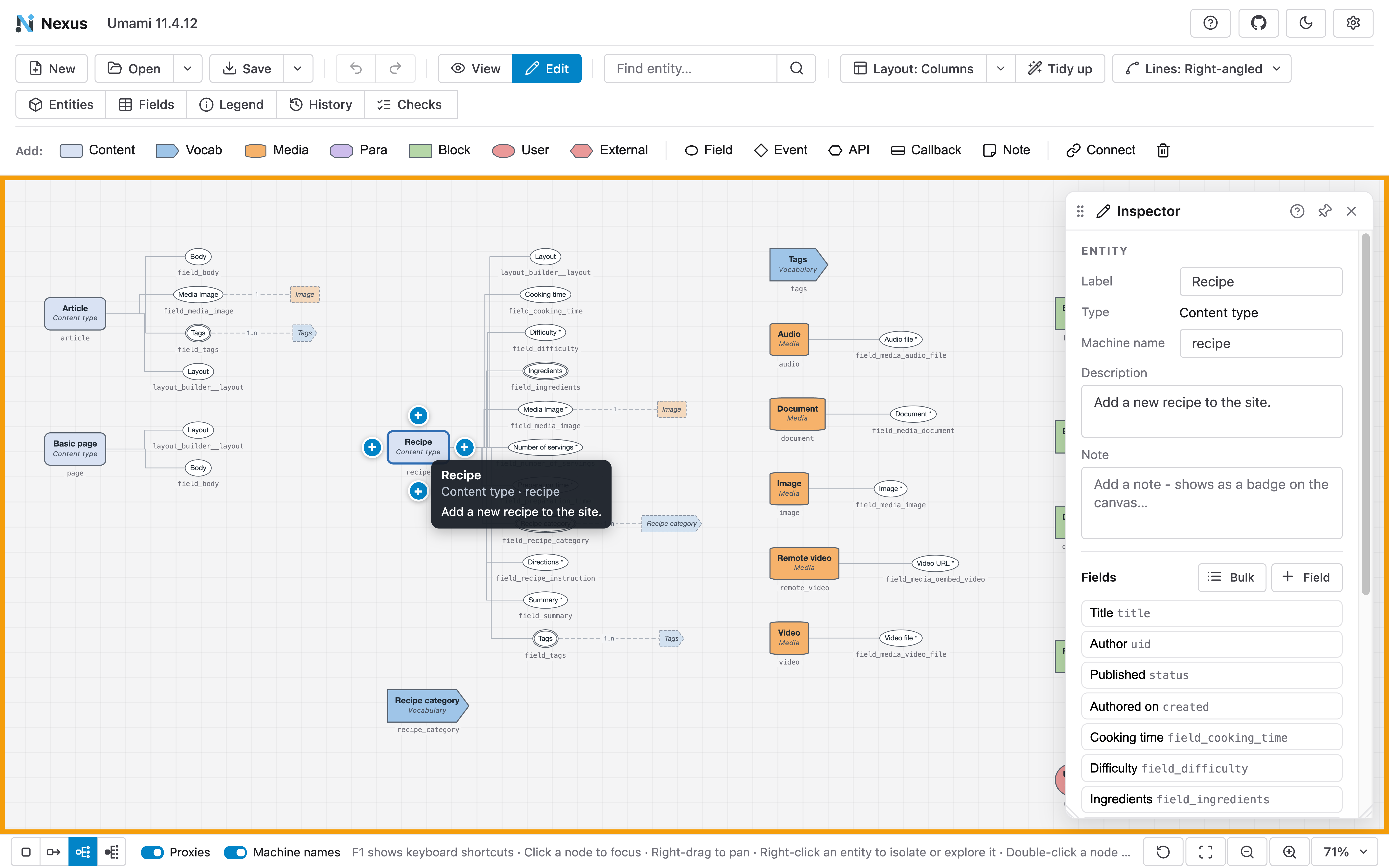
Edit mode gained a Note, a sticky note written in Markdown that you can place anywhere on the diagram for decisions, questions or open items. To remove things, select as many entities, fields and notes as you like and press Delete, or use the bin at the end of the Add bar. 1 undo brings them all back.
Start from a spreadsheet
Plenty of content models start life in a spreadsheet. Open > CSV file reads one with 1 row per field and draws it as a diagram, and Open > CSV template downloads an example with every column filled in. The import is strict on purpose: when a row has a problem, Nexus lists the first 5 problems with their row numbers and opens nothing, so you never work from a half-read model.
A fields CSV exported from Nexus imports back as the same entities, fields and references, so the spreadsheet and the diagram can hand work back and forth.
Document the model where your team works
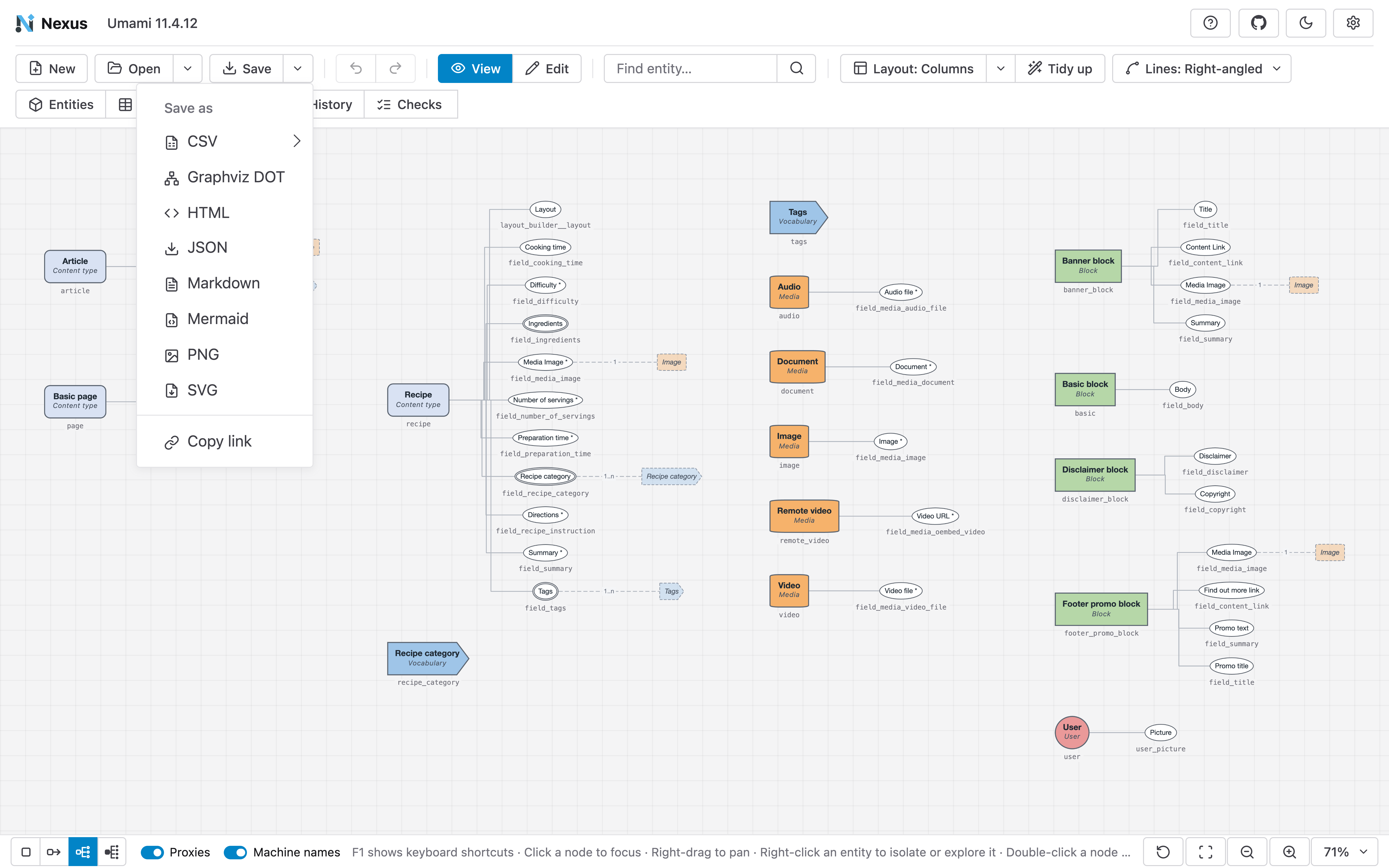
Save as now covers the places a content model needs to live:
- Markdown writes a page per model with a section for each bundle, its fields, its notes and what references it, and an optional Mermaid diagram, ready to commit next to the code.
- HTML writes the same documentation as a standalone report that opens in any browser.
- Mermaid and Graphviz DOT keep the diagram as text in a README, a pull request or a wiki.
- CSV exports fields, bundles and references, which together rebuild the usual spreadsheet spec.
- PNG and SVG export the canvas as an image.
Copy link packs the whole diagram into the link itself, so you can drop it into a chat or a ticket and it opens in 1 click with the same model and layout.
Built with AI agents in mind
Create with AI helps an AI agent turn a content model you hold in another form, such as a screenshot of a whiteboard, a spreadsheet or a Word spec, into a Nexus diagram. The site publishes a skill that agents like Claude Code, Codex or Cursor can follow, and a JSON Schema for the diagram format. The dialog copies the prompt for you and opens the document the agent writes.
Help on every panel
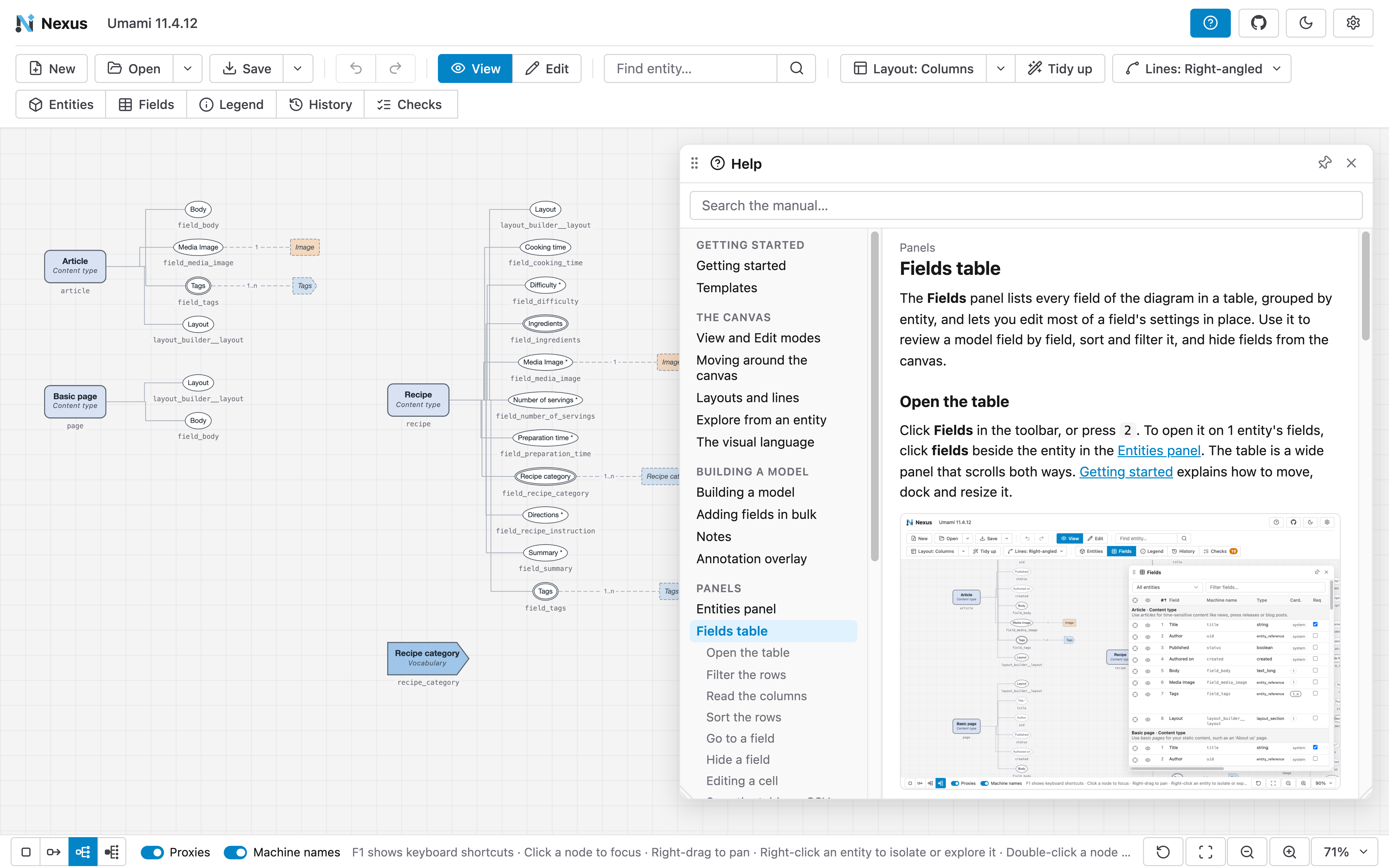
Nexus 1.0 comes with a user manual of 26 pages, from opening a first diagram to sharing it as a link, and the app shows it in a Help panel. The ? button on the toolbar, or the ? key, opens the manual, and each panel and dialog has its own ? that opens the page about it. A search box finds any page by its words.
The same pages are on GitHub(Opens in a new tab/window). The manual is built into the app, so a copy you host yourself carries it too.
Security you can check for yourself
Nexus opens files from anywhere: config folders, saved diagrams, shared links and documents an AI agent wrote. Because a content model often belongs to a client, we treated security as part of 1.0, and every measure below is one you can verify.
Your data stays in your browser, because Nexus has no backend. The
configuration you import and the diagrams you build stay in the
browser's memory until you save or export a file, or copy a link, which
carries the diagram inside it. A shared link keeps the diagram after the
# in the address, the part a browser never sends to a
server.
Nexus reads every file as data. Labels, notes and descriptions draw as text, so markup in them shows as written. Help text and descriptions render only basic formatting such as emphasis and lists, with scripts, attributes and styles removed. Colours, symbols and names from a file go through strict checks, and anything else falls back to the default. A crafted link stops unpacking at 5 MB, and CSV exports neutralise any cell that a spreadsheet would run as a formula.
A Content Security Policy lets the app run only its own scripts and load only its own files, so a file or a link can't run code in your browser. The HTML report you export loads nothing and runs no script at all.
Each library Nexus ships is the published npm build, byte for byte, and CI checks that on every run. Every release from 1.0.0 on is immutable and comes with SHA-256 checksums and a signed provenance attestation, so you can confirm that a file on nexus.drevops.com, or in your own copy, was built from the repository by its release workflow. The security policy(Opens in a new tab/window) shows the commands.
Nexus also holds the passing OpenSSF Best Practices(Opens in a new tab/window) badge and publishes its OpenSSF Scorecard(Opens in a new tab/window), and CodeQL scans every pull request. If you find a vulnerability, the security policy explains how to report it privately, and you get a reply within 3 business days.
Shaped by the community
After the launch, people in the Drupal community took Nexus for a spin and sent us their feedback. It shaped what went into 1.0, and we're grateful to everyone who took the time to try it and tell us what they needed.
Try it
Open nexus.drevops.com(Opens in a new tab/window), which always serves the newest release, and load a template or your own site's configuration folder. Pressing F1 labels every button with its keyboard shortcut. To host your own copy, download the release and serve it from any static web server.
The code is on GitHub(Opens in a new tab/window) under GPL-2.0-or-later, the same licence as Drupal. Ideas, bug reports and template suggestions are welcome as issues, and we'd like to hear what you'd want next.
Planning a new content model, a rebuild or a migration?
We are a Melbourne-based digital agency that builds and supports Drupal websites, and much of that work starts with understanding what a site holds, or what it needs to hold. If you're planning a migration, a rebuild or a new content model and would like a second pair of eyes on it, we're glad to talk it through.