If your website runs on PHP, 21 October was probably a long night. 2 critical PHP vulnerabilities were published that day: CVE-2026-109618 (GHSA-w8hw-w9fx-j79w(Opens in a new tab/window)) and CVE-2026-109619 (GHSA-6wmf-4rv5-p3rp(Opens in a new tab/window)). Each scores 9.2 and lets an attacker run code on the server without logging in, and proofs of concept were already circulating when the advisories went up.
Drupal runs on PHP, so every Drupal website was in scope. The only real fix was a patched PHP: 8.2.35, 8.3.36, 8.4.27 or 8.5.12, depending on the version a site runs.
We protected our clients' websites through the gap between the advisories and the fix, on both of the hosting platforms they run on, with the same approach on each.
The window of exposure
A patched PHP takes time to reach a website. Your hosting provider has to build and publish new images, your project has to pick them up, the change has to pass CI, and then it has to deploy to every environment. Each step is quick on its own. Together they add up to hours, sometimes longer, and the whole time the vulnerable PHP keeps answering requests from the internet.
Security teams call that stretch the window of exposure, and you'll also hear it called the patch gap. It opens the moment a vulnerability goes public and closes when the fix is live on every environment. While it's open, attackers know about the flaw, and your website still has it.
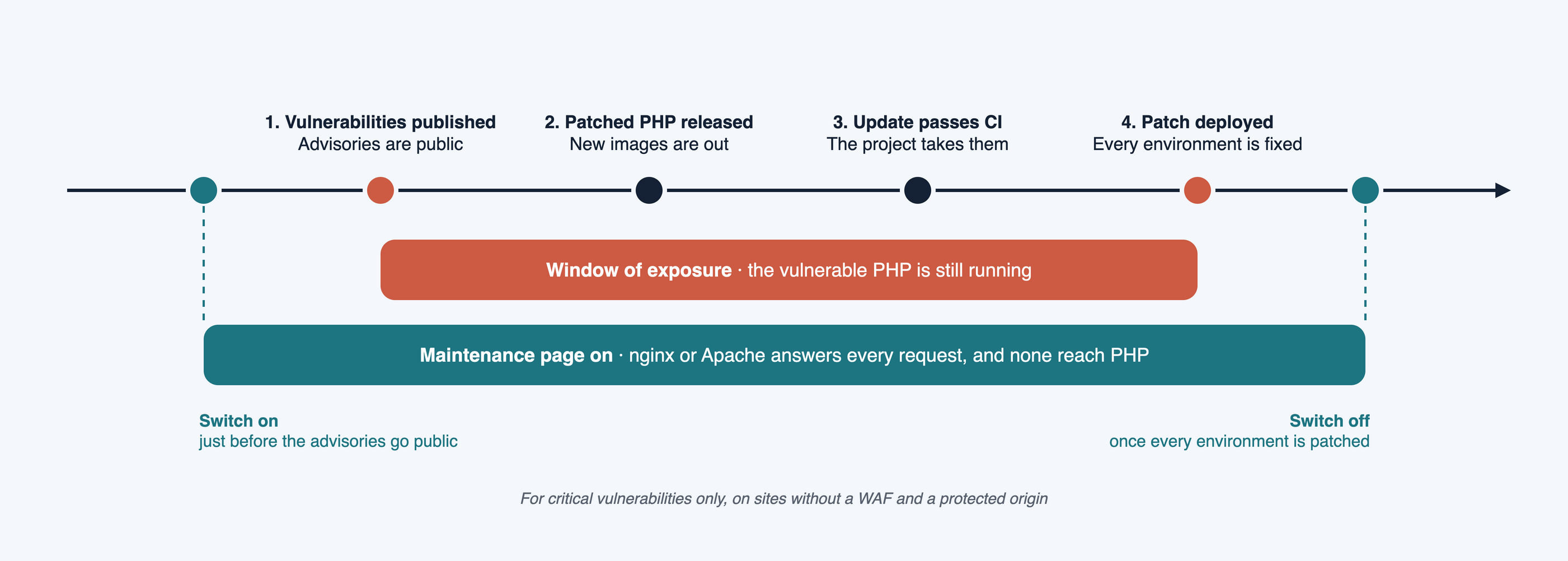
Only the patch closes the window, and each step before it takes the time it takes. What a team controls is what the website does while the window is open. For the most serious vulnerabilities, that's where the maintenance page comes in: switched on just before the advisories go public, and left on until the patch is live on every environment.
The idea: keep every request away from PHP
Both vulnerabilities need PHP to handle the attacker's request. In the first, a request that runs out of memory leaves PHP's request memory corrupted. In the second, a request acts on state an earlier request left behind. Either way, the request has to reach PHP for anything to happen.
So the safest state for a website in the window of exposure is one where PHP never sees a request at all. The web server in front of PHP answers everything itself, with a static maintenance page and an HTTP 503 status, which tells browsers and search engines the site is temporarily unavailable.
Visitors can't use the site while the page is on, and that's a real cost.
When to take a website down
A maintenance page is for critical vulnerabilities only, the kind serious enough that you absolutely need to take the site down. In practice that means an attacker can run code on the server without logging in, working exploits are public or about to be, and the fix isn't live yet. These 2 vulnerabilities met all of that. Most security releases don't, and for those the right response is to patch on a normal schedule with the site staying up.
It also depends on what sits in front of your website. A web application firewall (WAF) such as Cloudflare filters requests at the edge before they reach your server, and it can block known attack patterns while the site stays online. That protection holds only when the origin is locked down, so an attacker can't skip the firewall and reach the server directly.
We recommend a WAF with a protected origin for every website, and we're putting every site we look after behind one. The maintenance page is for the sites that don't have that protection yet, for whatever reason. For those, keeping every request away from PHP is the most reliable defence while the window is open.
Our clients host with 2 providers. Acquia runs Apache, and Lagoon runs nginx. The approach is the same on both, and only the web server configuration changes.
On Acquia: a maintenance branch with its own .htaccess
On Acquia, an environment runs whatever branch you deploy to it. That gave us a clean way to swap the whole site out.
We keep a separate branch in the site's repository that holds only a maintenance page: an index.html, the site's own stylesheets so the page looks like the site, and an .htaccess file. The branch shares no history with the main code and carries no Drupal code at all, so deploying it to an environment replaces the Drupal site with a static page.
The .htaccess file does the rest:
<IfModule mod_rewrite.c>
RewriteEngine On

# Let static assets through with their real status. A '.php' segment is
# excluded because path info would hand '/index.php/x.css' to PHP.
RewriteCond %{REQUEST_URI} !\.php(/|$) [NC]
RewriteCond %{REQUEST_URI} \.(css|js|woff2?|ttf|svg|png|jpe?g|gif|ico|webp)$ [NC]
RewriteRule ^ - [L]

# Everything else: maintenance body with 503.
RewriteCond %{REQUEST_URI} !^/index\.html$
RewriteRule ^.*$ /index.html [R=503,L]

ErrorDocument 503 /index.html
Header always set Cache-Control "max-age=0, no-store"
</IfModule>
Reading it from the top:
- Requests for stylesheets, scripts, fonts and images pass straight through with their normal status, so the maintenance page renders properly.
- A path with a
.phpsegment never counts as a static asset. Without that check, a request like/index.php/x.csswould match the asset rule, and Apache would pass it to PHP as path info. We added the check in the early hours of 22 October, about 2 hours after the advisories went up. - Every other request gets the maintenance page with a 503 status.
- The
Cache-Controlheader stops browsers and caches from keeping the maintenance page once the site is back.
To turn the page on, deploy the maintenance branch to the environment in the Acquia Cloud Platform. To turn it off, deploy the release branch back.
On Lagoon: a maintenance page served by nginx, built into Vortex
Our Lagoon websites are built on Vortex(Opens in a new tab/window), the open-source Drupal project template we maintain. Vortex 1.42.0 - Halo came out on 22 October, about 12 hours after the advisories. It moved to the Lagoon images with the patched PHP, and it added the same maintenance approach to the nginx image, so any site built on it can switch the page on with a single variable.
This is the nginx configuration it ships:
# Maintenance page.
#
# Answers every request with HTTP status 503 and the static maintenance page
# while VORTEX_NGINX_MAINTENANCE_MODE is set to 1, so no request reaches PHP.
#
# The image entrypoint replaces the placeholder below with the variable's
# value when the container starts, so a changed value needs a new container.

set $vortex_maintenance "${VORTEX_NGINX_MAINTENANCE_MODE:-0}";

# nginx runs these directives again for the internal redirect to the error
# page, so the page URI is exempt.
if ($uri = /__maintenance.html) {
  set $vortex_maintenance 0;
}

if ($vortex_maintenance = 1) {
  return 503;
}

# A URI error page makes nginx serve the page as GET, so POST and other
# methods get the page instead of a 405 response.
error_page 503 /__maintenance.html;

location = /__maintenance.html {
  internal;
  alias /etc/nginx/html/maintenance.html;
}
Here's what each part does:
- The first line reads
VORTEX_NGINX_MAINTENANCE_MODEwhen the container starts. It defaults to0, so the page is off unless you turn it on. - When the value is
1, every request gets a 503 response,POSTincluded, before nginx ever hands anything to PHP. - The
error_pageline swaps that 503 for the static page. Because it points at a URI, nginx serves the page as aGET, so a form submission sees the page too. - The page's own URI is exempt from the check, so nginx can serve it without looping.
On Lagoon, a changed variable applies on the next deployment, so switching the page on takes 2 commands:
lagoon add variable --project your_site --environment main \
  --scope runtime --name VORTEX_NGINX_MAINTENANCE_MODE --value 1
lagoon deploy latest --project your_site --environment main
To switch it off, set the value back to 0 and redeploy. The page itself is plain HTML in .docker/config/nginx/maintenance.html, so you can give it your site's branding.
If your site doesn't run on Vortex, the same block works in any nginx server configuration. Put a literal 1 in the first line while the page should be on, and point the alias at your own page.
What we took away from it
The switch is ready for the next one
Both mechanisms are now in place on our clients' websites. Next time, protecting a Lagoon environment means setting a variable and redeploying, and protecting an Acquia environment means switching to the maintenance branch. When the next disclosure lands, we pick the environments to protect, switch them over, and spend the rest of the window getting the patch through CI and out to every environment.
Expect more of these
AI tools are getting better at finding vulnerabilities, and at turning a published advisory into a working exploit. We expect disclosures like this one to come more often, with less time between the advisory and the first attacks.
That's why we'd suggest every site owner put a mechanism like this in place now, while things are calm. A switch that's already deployed and tested sits ready until you need it. Building one while the window is open means doing careful work under pressure, which is when mistakes happen.
Why we see this as a good thing
Few security announcements ask site owners to take a website offline. These 2 did, and that was uncomfortable for everyone involved. We still see the whole episode as a positive one, for 3 reasons.
First, the websites are more secure. Every one of them now runs the patched PHP, and every one has a way to keep PHP out of reach the next time it's needed.
Second, security has everyone's attention. Clients who rarely think about the PHP version under their website now know why it matters and what a patch involves, which makes the next conversation about updates easier for all of us.
Third, we tested the process on a real disclosure. We now know how long each step takes on each platform, from the advisory to the new images, through CI, and out to every environment. We know what's involved and what our clients can expect from us when the next one lands, and we learned from every step of it.
Get your switch in place now
If your Drupal website runs on Vortex, update to 1.42.0 and the maintenance page is already there, waiting for a variable. If it runs on something else, the 2 configurations above are a good starting point: the .htaccess for Apache hosts like Acquia, and the nginx block for everything else.
Is your website ready for the next critical vulnerability?
We are a Melbourne-based digital agency that builds and supports Drupal websites. If you'd like a switch like this on your website before the next disclosure, talk to us.